Procedure or function sp_MSreplraiserror has too many arguments specified.

UPDATE (27/02/2018)

Some great news! It seems that that error been fixed in SQL 2014 SP2 CU3. More information here . They added following logic at the end of the replication procedures:

            IF @@rowcount = 0 
              IF @@microsoftversion > 0x07320000 
                BEGIN 
                    IF EXISTS (SELECT * 
                               FROM   sys.all_parameters 
                               WHERE  object_id = Object_id('sp_MSreplraiserror' 
                                                  ) 
                                      AND [name] = '@param3') 
                      BEGIN 
                          SET @primarykey_text = 
                          @primarykey_text + '[TableD_ID] = ' 
                          + CONVERT(NVARCHAR(100), @pkc1, 1) 

                          EXEC Sp_msreplraiserror 
                            @errorid=20598, 
                            @param1=N'[dbo].[TableD]', 
                            @param2=@primarykey_text, 
                            @param3=13233 
                      END 
                    ELSE 
                      EXEC Sp_msreplraiserror 
                        @errorid=20598 
                END 


It seems it is checking a version of SQL and if version is low it is executing proc without additional parameters.

Still if patching server is not an option for you, follow this blog post:)

END OF UPDATE

This is quite common error when you upgrade your 2014 publishers with SP2. First of all the best way of upgrading your replication infrastructure is to start with subscribers. In real world this is not always possible.

This error occurs when you apply SQL 2014 SP2 to your publishers but not to subscriber. It seems Microsoft modifying error handling (thank GOD!) for replication. Currently as you may know when u getting PK, row not found errors you only getting seqno and command id. Since 2014 SP2 the replication will give you table name and values of Primary Key (to identify the duplicate/missing row). That is great improvement as you don’t need to go to distributor to browse commands (more about browsing commands over here …. )

They added 3rd parameter to sp_MSreplraiserror procedures. Since this is systems proc you not able to update it on subscriber. The only permanent solution for this is applying SP2 to your subscriber.

However there is a workaround for this but only temporary one. First step is to script out ALL replication procs for given publication on publisher. Using following script:

sp_scriptpublicationcustomprocs @publication = ”

Once you copy output, paste it on subscriber db and replace  ‘,@param3=’ with ‘- -@param3=’

As I said this is just temporary solution as these procedures may be overwritten if you make changes to some or all articles, you create new subscription or drop/recreate it etc. When you add new articles you will need to repeat process for all articles or if you like for given articles you just added.

I know it is not the best solution for this but I don’t see any other way of doing it. If you do have other ideas, let me know in comments.

How to setup Transactional Replication? Part 1

Distributor:

The main part (and 1st step) of the setup is configuring Distributor. Either it can be located on the same instance as a publisher (not recommended as it will add some load to your Publisher) or configure as remote distributor.
As always you can do this using GUI or T-SQL.

For purpose of this article I created three named instances, PUBLISHER, DISTRIBUTOR and SUBSCRIBER. Remember that anytime you want to work on Replication you need to connect to full named instance name (in my Case MainTest\Distributor etc.)

First step is enable distributor on the instance that will be running as a Distributor.
Using GUI,  go to Replication  in SSMS, right click and choose Configure Distribution from there you will be moved to Distribution Wizard.
After first page u need to choose “<server name> will act as its own distributor, SQL Server will create a distribution database and log” It will create default distribution database on that instance and enable also this instance as a Publisher. Later on if u decide to use different distribution db (or create multiple distribution dbs) you can remove that default distribution db.

Configuredist_1

Then choose path where the snapshot will be located. Check if there is enough space on that drive as some full snapshots of all your published articles can be very big.

configuredist_2

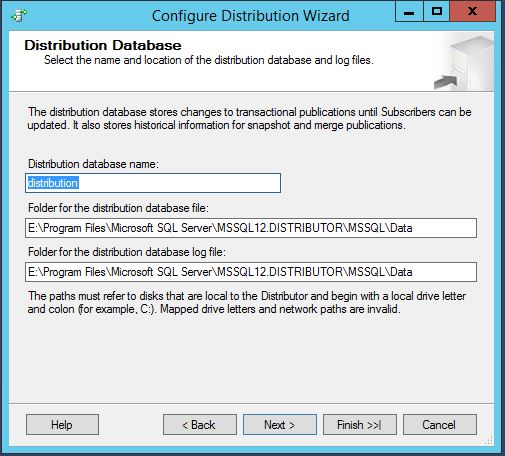
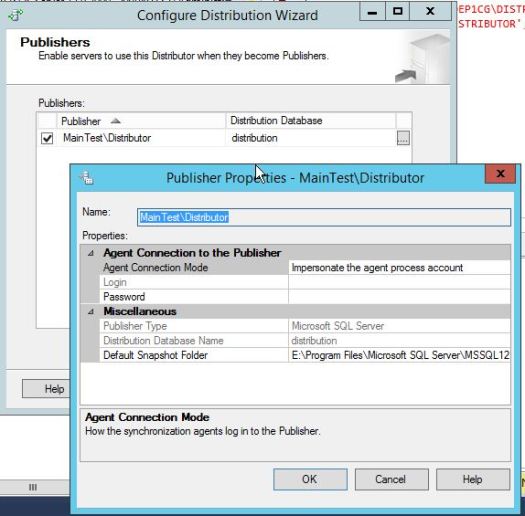
Next you will need to provide a distribution db name and path to the distribution db data file and log file. Same as you creating any new user db. On the next page this distribution db will be automatically Mapped to the publisher instance (which in this case will be your distribution name). You can also choose how Distributor will authenticate with Publisher. In most of the cases you will use Windows auth and the SQL Service account (or dedicated AD account). This will end of the Distributor configuration.

configure_distributiondb1

Configuredist_3
Now when right clicking on Replication tree you will have 3 new options.
When choosing Distributor Properties you can modify :
-distributor setting (like retention period etc.)
-dropping/creating distribution
-mapping publishers to given distribution db
-managing Agent Profile Defaults (here you can change profiles for every agent on distributor)
Now we want to configure distributor for our MainTest\Publisher instance. In order to do this first we need to configure new (or use existing one) distribution db under Distributor Properties. We already have one default distribution db on that instance however for purpose of this article we will create new one.
After clicking “New” you can change database name, database paths and retention period.
I strongly suggest if you have enough disk space set this as a fixed range (min and max on same value). Later on it can save you some work. If you leave default setting (0-72 hours) the transactions that been delivered to subscriber will be removed straight away during next distribution cleanup run also it will remove any transactions older than 72 hour (does not matter if delivered or not).
If you set fixed values lets say Min = 48 hour and Max=48 hours. In this case Cleanup will remove only transactions older than 48 hours. It will NEVER remove data that been inserted within last 48 hours. In some cases it can save u lots of work as you can manipulate with LSN of replication transactions in order to set back the replication in time (will write about this bit later). In our case it works as kind of “DR” solution (not often but still).configuredist_4

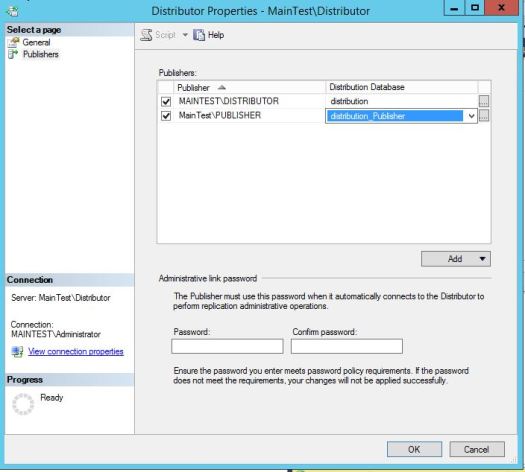
After creating new distribution db on the left pane go to “Publishers” and add new one, connect to it and map it to correct distribution database. On the same page SQL will ask u to provide a password for user that Publisher will use to connect to Distributor. Save this password as it will be used for EACH Publisher that will use that remote distributor.

configuredist_5

Publisher:

Last part of configuration is to go to Publisher and point it to configured distributor by providing a password that will be used to connect to Distributor.
Right click on Replication component and choose configure distribution. You will get same Wizard as before on Distributor however on 2nd page choose second option and point it to your distributor. Next page will ask you for password that you set in previous step.

configure_publisher_1

publisher2

publisher3
Once this wizard is completed you good to start creating publications and sending it to subscribers. But this I will cover in next article.


Other way to get this done is by using T-SQL. It is much quicker especially when you need to setup few of these.

How to do it? I will show it in next blog post.

Configuring distributor and publisher with T-SQL

Transactional Replication – How it works?


Replication is one of the most “mature” technology of SQL Server that are bit underrated these days with all AG, Mirroring and other new technology coming now with SQL Server.

As the name says it is Transactional it means it is log based.
This is how it works:
Lets say we doing an insert into published table:
1. Insert transaction is marked as “for replication” in the transaction log of the published database.
2. Log reader that is responsible for reading a log is picking up that transaction (I will go more detail in other article) and it puts the information about this transaction into distribution db on distributor
3. Once the transaction has been read by log reader it can be cleared when next checkpoint (simple recovery) or next tran log backup (full recovery) occur.
4. Distribution agent is picking up next transaction from distribution database and it is delivering that transaction to subscriber.

These 4 simple point describing high level of “how transactional replication works”. We will go more in detail about each of these steps.

AS You noticed we have few components that are crucial for replication to work. Here are the list and short descriptions

Publisher – Is the source of published data.
Distributor – it is connecting to publisher to take the published information, store it and distribute it to subscribers.
Subscriber – it is destination of published data.

You can compare Transactional Replication to printed newspaper subscription. Publisher (New York Times, Washington Post etc.) is creating and publishing information (Articles), Distributor (currier company or post office) is delivering the newspaper to ALL Subscribers that paid for subscription.

Other important components of transactional replication are the AGENTS, each with different tasks.
The main agents for transactional replication are:
Log Reader – running on distributor and connecting to publisher in order to read marked transactions and deliver these to distributor
Snapshot Agent – Is the agent that doing a snapshot of published articles in two main cases : When initial snapshot of all articles are made or when our publication is in “full sync” mode and we are adding new articles into replication
Distribution Agent – Its main job is delivering replicated transactions to all subscribers

Log reader and Distribution Agent are running continuously and should not be stopped for longer period. Each agent is actual SQL Job (usually located on distributor, pull subscription has distribution agents located on subscriber) have sets of parameters that DBA can tweak it (like multi streaming).

These are basics of transactional replication. Now we can go more into the detail. In next articles I show you how to setup, maintain, tweak and fix (or break:)) it.